
Build Your Own Palworld Server, Part 5: Vendor & Wanted-NPC Markers on the Map
Published 2026-07-15 · SameOS Tools
The live map from part 4 only showed fast-travel points and boss towers. This time I added vendors (pal merchants, wandering merchants, black marketeers) and 164 wanted NPCs. Adding the markers took thirty minutes - what actually ate the evening was "it is all built and nothing shows on screen." Three causes were stacked on top of each other. Here they are in the order I hit them.
Marker Data - One JSON File
All marker positions live in a single poi.json, grouped by kind. Markers that need no name (fast travel, boss towers) are plain coordinate pairs; vendors and NPCs carry a name (n) with the position (p), and vendors also a kind (k) that picks the icon. The coordinate numbers come straight from the game - stand at the spot, open the map (M), and the world coordinates under the cursor are shown; write those two numbers down. I walked to all 15 vendors myself and pulled the wanted-NPC coordinates from game data. If you are starting out, begin with two or three vendors - once the format matches, any count works the same.
// map/poi.json - markers grouped by kind (raw world coordinates)
{
  "fast_travel": [[-327532, -70411], [-50301, 287392], ...],
  "boss_tower":  [[-121325, 262935], ...],
  "vendors": [
    {"n": "Pal Merchant",       "k": "pal",      "p": [-344208, 193802]},
    {"n": "Wandering Merchant", "k": "merchant", "p": [-181263, 369140]},
    {"n": "Black Marketeer",    "k": "black",    "p": [-38295, -419295]}
  ],
  "npcs": [
    {"n": "Attention-Seeking Monster Dazzle", "p": [-711867, -229855]},
    {"n": "Serial Borrower Pinch",            "p": [-686622, -380407]}
  ]
}
Rendering Layers - One div per Kind
Rendering is simple: one div per kind, fill it with image tags from poi.json. Named markers (vendors, NPCs) get a title attribute so hovering shows the name. Vendors additionally get a per-kind description of what they sell - individual stock differs by location and patch, so instead of inventing lists I only state what each kind reliably sells. The code below is self-contained, helpers included - paste it at the end of public/app.js and it runs without part 4.
// Paste this whole block at the end of public/app.js (helpers included)
// helper 1) find an element by id
const $ = (id) => document.getElementById(id);
// helper 2) keep names with special characters safe (escape quotes etc.)
function escapeHtml(t) {
return String(t).replace(/[&<>"']/g, (c) =>
({ "&":"&", "<":"<", ">":">", '"':""", "'":"'" }[c]));
}
// helper 3) game world coordinates → % position on the map image
// (Palworld world bounds - use these numbers as-is)
const WORLD = { minX: -999940, minY: -738920, span: 1447840 };
const worldToPct = (x, y) => ({
left: ((y - WORLD.minY) / WORLD.span) * 100,
top: (1 - (x - WORLD.minX) / WORLD.span) * 100,
});
// main) read poi.json and draw each layer
fetch("map/poi.json?t=" + Date.now(), { cache: "no-store" })
.then((r) => r.json()).then((poi) => {
const named = (src, title) => (pt) => {
const p = worldToPct(pt.p[0], pt.p[1]);
return `<img class="poi poi-named" src="${src}" title="${escapeHtml(title(pt))}"
style="left:${p.left.toFixed(2)}%;top:${p.top.toFixed(2)}%">`;
};
// what each vendor kind sells (kind-level only - stock varies by spot)
const vendorSells = {
pal: "Pal Merchant · sells pals from the local region (varies by spot)",
merchant: "Wandering Merchant · arrows, gunpowder, leather, cake ingredients",
black: "Black Marketeer · rare and humanoid pals",
};
$("map-vd").innerHTML = (poi.vendors || []).map((v) =>
named(`map/icon-${v.k}.svg`, (x) => vendorSells[x.k] || x.n)(v)).join("");
$("map-npc").innerHTML = (poi.npcs || []).map(named("map/icon-npc.svg", (x) => x.n)).join("");
});
// layer checkboxes
$("toggle-vd").addEventListener("change", (e) => { $("map-vd").hidden = !e.target.checked; });
$("toggle-npc").addEventListener("change", (e) => { $("map-npc").hidden = !e.target.checked; });On the map HTML side you only add two layer divs and two checkboxes. No image editor needed for the icon - save the SVG text below as a file and that is the icon (a red target shape). Make the vendor icons the same way with different colors.
<!-- add to the layers area of the map HTML -->
<label><input type="checkbox" id="toggle-vd" checked> Vendors</label>
<label><input type="checkbox" id="toggle-npc" checked> Wanted NPCs</label>
...
<div id="map-vd"></div>
<div id="map-npc"></div>

<!-- save as map/icon-npc.svg - this text IS the icon -->
<svg xmlns="http://www.w3.org/2000/svg" viewBox="0 0 24 24">
  <circle cx="12" cy="12" r="9"   fill="#7f1d1d" stroke="#fca5a5" stroke-width="2"/>
  <circle cx="12" cy="12" r="4.5" fill="none"    stroke="#fca5a5" stroke-width="1.6"/>
  <circle cx="12" cy="12" r="1.4" fill="#fca5a5"/>
</svg>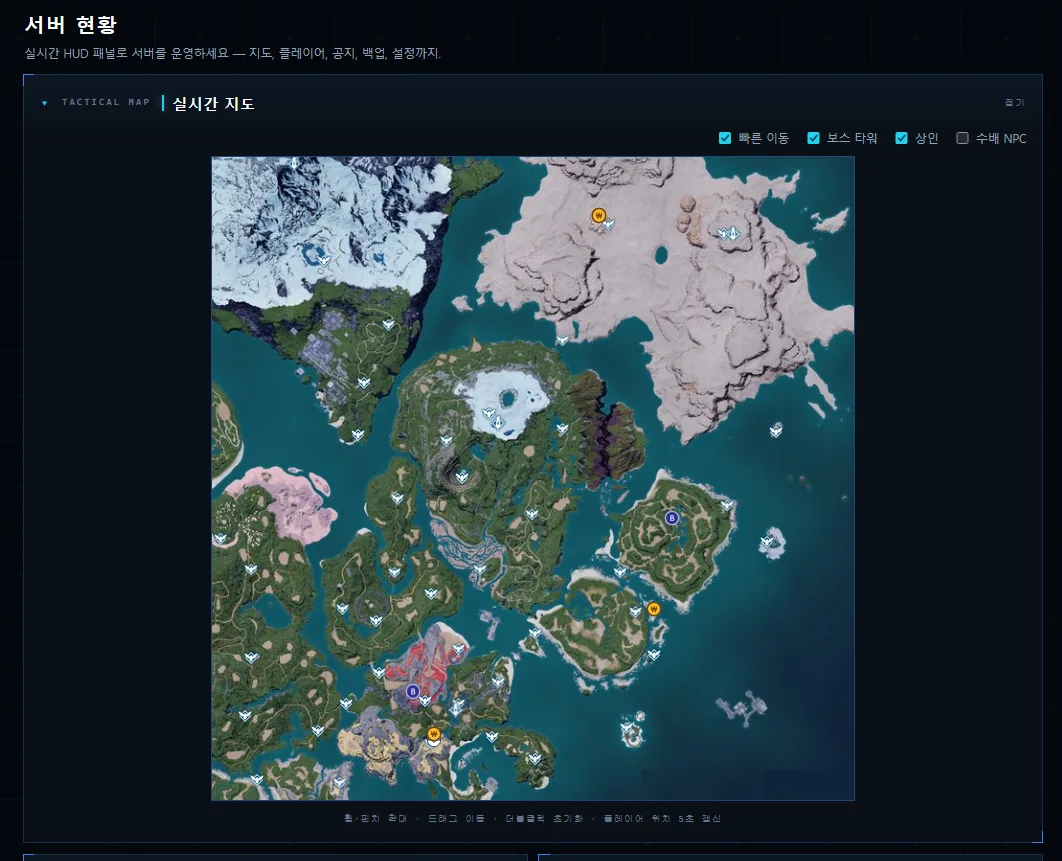
And Then Nothing Showed - Three Causes
With all of that built, I opened the map and saw zero NPCs. Data, code and icons all checked out, which made it worse. Three causes were stacked. First, since there are 164 markers I had made the NPC layer default to hidden - and forgot. Second, poi.json sat in the same folder as the map tiles, so the "cache map tiles for a day" rule caught the data file too: the browser kept reusing yesterday's poi.json (which had no NPCs) for 24 hours. Third, the admin page copies files into the Docker image at build time (COPY), so edits on the host never reach the running container until you rebuild.
# One fix per cause - all three are needed before anything shows

# 1) layer default: drop hidden + check the checkbox
#    <div id="map-npc" hidden>  →  <div id="map-npc">

# 2) split caching: images cache long, data always fresh
"Cache-Control": /\.(webp|png|svg)$/.test(rel)
    ? "public, max-age=86400"   # map tiles, icons
    : "no-cache",               # data like poi.json

# 3) Docker rebuild: COPY means edits need a build
docker compose build palworld-admin
docker compose up -d palworld-admin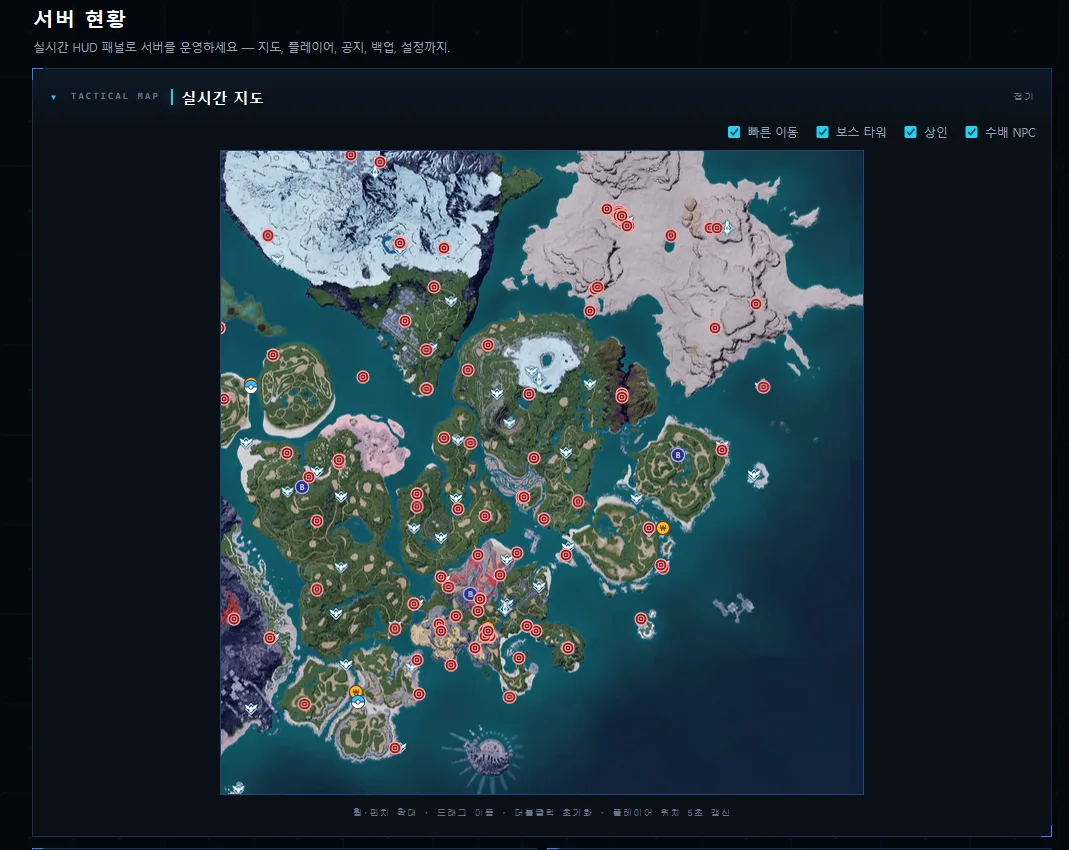
The lesson is plain. When "it does not show on screen," walk the chain with your own eyes - data → render → visibility state → cache → deploy path - and something will snag. This time three of the five snagged at once. The cache mistake in particular (letting a data file inherit image caching rules) is easy to repeat in any project, so make "images cache long, data always fresh" a rule from day one.